Thursday, February 25, 2016
Why Educators Need to Promote Themselves
Why Educators Need to Promote Themselves: Educators often have trouble acknowledging their contributions to good outcomes. Here are some tips for changing that.

Monday, February 22, 2016
Drop the Textbooks and Blend Language Learning
The 2016 is going to be a very exciting year form the Language Department of the Kenai Peninsula School District (KPBSD). Indeed we are going to see a drastic change in how students learn all the World Language classrooms since all World Languages teachers will have to implement a blended format. KPBSD has indeed recently completed the curriculum review for the World Languages courses offered within the district, and the committee has opted with an unanimous and strong decision in favor of adopting a digital curricula for ALL the language courses offered in the district. This decision is aligned with the vision of the district administration to move toward digital content for the classrooms.
The revision process has been rigorous, evaluating traditional and web-based curricula side by side following a rubric based on the standards defined by the American Council of Teachers of Foreign Languages (ACTFL), the national leader organization in the teaching of world languages.
 This was the first time I was participating in the curriculum review process and the experience has been very interesting and instructive. Being an online teacher, the only online foreign language teacher in the district, I was pleased in having the opportunity to bring to the table my different prospective, and collaborate with other WL teachers in finding the best fit for our students.
The adoption of an online based curriculum requires some structural changes in the traditional classrooms and how the learning is going to happen, and some of them were welcomed by some teachers. First of all WL classrooms will receive a class set of Chrome-books for allow students to access to the online content. Second the teachers will have to implement a Blended Learning format for their classroom. This specific step does require a specific, timed, well planned and delivered professional development (PD) for the classroom teachers, who will need to learn what Blended Learning is, what are the various ways in which it can be implemented, and finally being able to identify the format that would better fit their teaching style, their classroom needs, and what they want to achieve.
It is definitely an ambitious goal that will require time for being perfected, and I am expecting trials and errors along the way, which is normal in a learning process. Last year I had the opportunity to experiment a similar learning progress when I had to start a traditional classroom French program in one of the KPBSD high schools. Coming from a 100% online teaching experience, I found a natural fit in the use of the Flipped Classroom approach from my classroom courses. One of the most interesting observations in the roll-out of this plan was looking at the switch in the student behavior from the beginning of the year when they were very passive and they needed to "hold their hand", to the point in which for the most part they knew what to do and were able to proceed independently in their learning in and outside of the classroom.
The transformation of a traditional classroom to a blended format requires a very well made plan and also a lot patience and determination from the teacher, especially at the beginning, when the students used to be mostly passive learners in their classrooms, will find themselves pushed in uncomfortable new learning territories, in which they are required to become actively participants in their education.
I have an invested interest in following the process of implementation of the Blended Learning in my WL department, since I would like to collect data for a research paper focused on this case study. My goal is to monitor the effectiveness (positive or negative) of this switch in the increase language acquisition in the students enrolled in these blended courses.
More will come....
The revision process has been rigorous, evaluating traditional and web-based curricula side by side following a rubric based on the standards defined by the American Council of Teachers of Foreign Languages (ACTFL), the national leader organization in the teaching of world languages.
 This was the first time I was participating in the curriculum review process and the experience has been very interesting and instructive. Being an online teacher, the only online foreign language teacher in the district, I was pleased in having the opportunity to bring to the table my different prospective, and collaborate with other WL teachers in finding the best fit for our students.
The adoption of an online based curriculum requires some structural changes in the traditional classrooms and how the learning is going to happen, and some of them were welcomed by some teachers. First of all WL classrooms will receive a class set of Chrome-books for allow students to access to the online content. Second the teachers will have to implement a Blended Learning format for their classroom. This specific step does require a specific, timed, well planned and delivered professional development (PD) for the classroom teachers, who will need to learn what Blended Learning is, what are the various ways in which it can be implemented, and finally being able to identify the format that would better fit their teaching style, their classroom needs, and what they want to achieve.
It is definitely an ambitious goal that will require time for being perfected, and I am expecting trials and errors along the way, which is normal in a learning process. Last year I had the opportunity to experiment a similar learning progress when I had to start a traditional classroom French program in one of the KPBSD high schools. Coming from a 100% online teaching experience, I found a natural fit in the use of the Flipped Classroom approach from my classroom courses. One of the most interesting observations in the roll-out of this plan was looking at the switch in the student behavior from the beginning of the year when they were very passive and they needed to "hold their hand", to the point in which for the most part they knew what to do and were able to proceed independently in their learning in and outside of the classroom.
The transformation of a traditional classroom to a blended format requires a very well made plan and also a lot patience and determination from the teacher, especially at the beginning, when the students used to be mostly passive learners in their classrooms, will find themselves pushed in uncomfortable new learning territories, in which they are required to become actively participants in their education.
I have an invested interest in following the process of implementation of the Blended Learning in my WL department, since I would like to collect data for a research paper focused on this case study. My goal is to monitor the effectiveness (positive or negative) of this switch in the increase language acquisition in the students enrolled in these blended courses.
More will come....
Saturday, December 12, 2015
Fail to plan is plan to fail!
Mr. Franklin was very right, a good plan is very important for a successful outcome. This is absolutely right when we are talking about the creation of videos for an online course.
In the past I have done my share of video on the moment, with outcomes that sometimes were very disastrous, taking so much time for cleaning up the videos from pauses, stumbling thoughts, and so forth.
Planning a good video is a task that requires time and effort for doing it right.
Various elements that needs to be considered in the planning process are
SCRIPT - Introduction to Mrs. Pokryfki's courses
.
CHALLENGES
Sure, every project has to have a good share of challenges to deal with. In my case, for this specific video I came upon a good variety.
1. Do not give for granted that the content of your course will be the same next year ... with the Foreign Language department curriculum review will come new material - I am very excited about this, but I will discuss it in another post - therefore the video I have created right now might not be accurate next year.
2. Do not give for granted that the LMS interface will be the same next month!Just last Friday I was informed that in January we will be moving to the new interface which means that all the videos we have made new last August will be to be redone!
3. Plan in advance a general script and be ready to adjust it at the last minute since you do not always have access to the new interface long before students roll in your courses.
These are some of the challenges you might encounter, but I am sure that there can be more to add to the list.... Bottom line, be ready like a Kong-Fu Panda for attacking the content and create your videos :)
In the past I have done my share of video on the moment, with outcomes that sometimes were very disastrous, taking so much time for cleaning up the videos from pauses, stumbling thoughts, and so forth.
Planning a good video is a task that requires time and effort for doing it right.
Various elements that needs to be considered in the planning process are
- Time-frame - Best practices recommend to stay within the 3 minutes but depending on what you are trying to present, sometime you need more time. No matter what, try not to go over 7 minutes.
- Consider what you want to present to your audience: what are the sections of the course you want to show or highlight? Why?
- Focus on the anchors of the course, the important elements that every student should be familiar with right from the start.
- WRITE it DOWN! Yes, it is important to do it! Yes, often we THINK we know what we are going to say, but the truth is that when we start recording ourselves we can so easily get sidetracked and loose the target we had in mind the at the beginning. The result usually is a very unpleasant and not very functional waste of time!
Write down what you want to present in a script. Educational Use of Digital Storytelling is a great site for finding resources for this process, including templates for the storyboard of your video. I like the simplicity of the second version of the Word template found in the middle of the article.
- Evaluate which tools you ave available for recording your work, compare pros and cons depending on the situation. Sometime you need to make a podcast on the fly, so you are willing to sacrifice on quality of image or sound, while if you have the time and the access to a good video/screen recording tool, is worth to spend the extra time for doing a good final product.
Personally I like to use Camtasia Studio for creating my videos. It requires some editing, but it has great potentials!
SCRIPT - Introduction to Mrs. Pokryfki's courses
.
CHALLENGES
Sure, every project has to have a good share of challenges to deal with. In my case, for this specific video I came upon a good variety.
1. Do not give for granted that the content of your course will be the same next year ... with the Foreign Language department curriculum review will come new material - I am very excited about this, but I will discuss it in another post - therefore the video I have created right now might not be accurate next year.
2. Do not give for granted that the LMS interface will be the same next month!Just last Friday I was informed that in January we will be moving to the new interface which means that all the videos we have made new last August will be to be redone!
3. Plan in advance a general script and be ready to adjust it at the last minute since you do not always have access to the new interface long before students roll in your courses.
These are some of the challenges you might encounter, but I am sure that there can be more to add to the list.... Bottom line, be ready like a Kong-Fu Panda for attacking the content and create your videos :)
Saturday, November 21, 2015
The Cloud for Collaboration
One of the most relevant tools for increasing engagement in online
courses has been proved to be the interpersonal connection, which is
strongly supported with the use of collaboration as format for formative
assessments and practices.
Based on the feedback I have received from my online students over the years, they always loved the opportunity to feel being part of a class and sharing ideas and experiences with their peers.
Usually LMSs offer opportunity for fostering collaboration among students. For Moodle users some build-in tools for collaborations are the forums, great for class discussions, the glossaries, good tools Poodles offer
the opportunity for collaboration using voice or video recordings -
however, based on my experience, they can be giving some technical
challenges sometimes.
for collaborative activities on specific topics;
With Canvas the build-in collaborative tool is the discussion. A very nice feature of this tool is the option of assigning peers review of the post either manually or randomly, which means that each student is given the name(s) of the person(s) they need to interact with. This helps in pushing students toward reading and commenting on posts of people they do not know and that they might not have chosen on their own.
My favorite collaborative tool that I have been using for several years is VoiceThread. The best way I can explain what this tool does, is defining it as PowerPoint on steroids! You can use still images or videos individually or in a slide show, and students can comment on each frame typing or recording their voice or video. Everyone can listen to other people's posts and they can build in or comment. I have used this tool in various ways: mostly I used for recreating the classroom interaction with my students in the target language. What I like so much about this tool is that is so versatile and I can use it for my interactions with students as class while each of them can listen to what other students are saying. For foreign languages online courses this is a great asset!
Other tools that I have been using include Google Doc/Google Drive for , Blackboard Collaborate, and Microsoft Lync.
Researching on the Internet for resources I have found several websites providing a lot of good resources. Those that I would like to recommend are Kathy Schrocks - Guide to Everything
and EmergingTechEd. These sites present a very good variety of tools for promoting collaboration.
One tool that I have found on these sites that I have not yet yet but that I find intriguing to try is
Bubbl.us.
I am not quite sure how to implement this tool to my courses, but I think that it would be a good tool for reviewing language structures in peer groups. I will play with it and I will add more ideas for using Bubbl.us in another post.
Based on the feedback I have received from my online students over the years, they always loved the opportunity to feel being part of a class and sharing ideas and experiences with their peers.
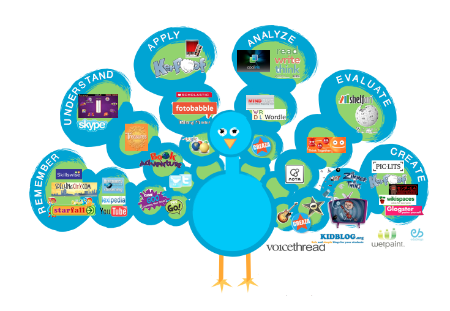 |
| https://cynthiabaertichblog.files.wordpress.com/ 2014/07/100-best-web-2-0-classroom-tools.png |
for collaborative activities on specific topics;
With Canvas the build-in collaborative tool is the discussion. A very nice feature of this tool is the option of assigning peers review of the post either manually or randomly, which means that each student is given the name(s) of the person(s) they need to interact with. This helps in pushing students toward reading and commenting on posts of people they do not know and that they might not have chosen on their own.
My favorite collaborative tool that I have been using for several years is VoiceThread. The best way I can explain what this tool does, is defining it as PowerPoint on steroids! You can use still images or videos individually or in a slide show, and students can comment on each frame typing or recording their voice or video. Everyone can listen to other people's posts and they can build in or comment. I have used this tool in various ways: mostly I used for recreating the classroom interaction with my students in the target language. What I like so much about this tool is that is so versatile and I can use it for my interactions with students as class while each of them can listen to what other students are saying. For foreign languages online courses this is a great asset!
Other tools that I have been using include Google Doc/Google Drive for , Blackboard Collaborate, and Microsoft Lync.
Researching on the Internet for resources I have found several websites providing a lot of good resources. Those that I would like to recommend are Kathy Schrocks - Guide to Everything
and EmergingTechEd. These sites present a very good variety of tools for promoting collaboration.
One tool that I have found on these sites that I have not yet yet but that I find intriguing to try is
Bubbl.us.
I am not quite sure how to implement this tool to my courses, but I think that it would be a good tool for reviewing language structures in peer groups. I will play with it and I will add more ideas for using Bubbl.us in another post.
Subscribe to:
Posts (Atom)